
Spring Boot의 @Scheduled를 사용해서 스케줄 기능을 구현해보자.
로직 설명
- 매분 0초에 로직 실행
- 종료 시간이 현재 시간보다 이전이거나 같은 모든 Reservation을 조회
- Reservation이 존재한다면 삭제
@EnableScheduling 설정하기
스케줄러 기능을 사용하기 위해서는 메인 클래스에 @EnableScheduling 어노테이션을 추가해야한다.
@SpringBootApplication
@EnableScheduling
public class TestApplication {
	public static void main(String[] args) {
		SpringApplication.run(TestApplication.class, args);
	}
}
@Scheduled 사용해서 기능 구현하기
@Component
@RequiredArgsConstructor
public class ReservationScheduler {

    private final ReservationRepository reservationRepository;

    @Scheduled(cron = "0 * * * * *") // 매분 0초에 실행
    public void deleteExpiredReservations() {
        LocalDateTime now = LocalDateTime.now();
        // 종료 시간이 현재 시간보다 이전이거나 같은 모든 예약을 조회
        List<Reservation> expiredReservations = reservationRepository.findByEndTimeLessThanEqual(now);

        if (!expiredReservations.isEmpty()) {
            reservationRepository.deleteAll(expiredReservations);
        }
    }
}
메서드를 실행할 시점을 cron 표현식을 통해 매분 0초에 실행하도록 하였다.
cron 표현식은 http://www.cronmaker.com/;jsessionid=node01q9e30jdcdvuf19c2pr45qgdhf496120.node0?0
해당 사이트를 통해 구할 수 있다.
findByEndTimeLessThanEqual 메서드를 repository에 추가하여 종료 시간 <= 현재 시간 인 예약을 조회한다.
Reservation이 있다면 deleteAll을 사용해 한꺼번에 삭제한다.
결과
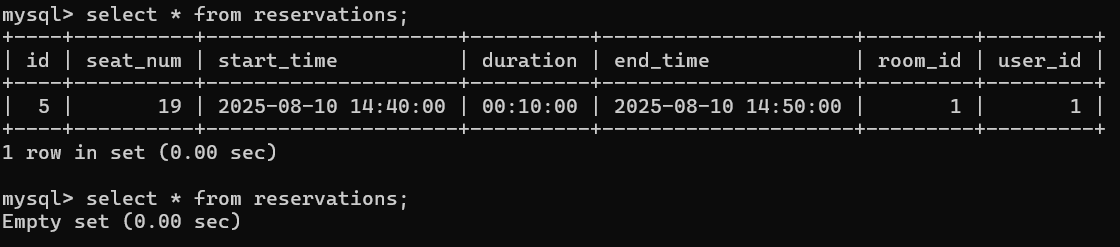
설정한 14시 40분에서 10분이 지난 50분에 다시 조회했더니 삭제된 것을 볼 수 있다.

감사합니다 ˘⌣˘
'Development > Back-end' 카테고리의 다른 글
| [Spring Boot] JWT 서명 알고리즘 (2) - HS256 (0) | 2025.08.18 |
|---|---|
| [JWT] JWT 서명 알고리즘 (1) - HMAC, RSA (0) | 2025.08.18 |
| [Spring Boot] Redis를 사용한 로그아웃 구현하기 (0) | 2025.07.23 |
| [Spring Boot] Pagination(페이지네이션) (0) | 2025.07.15 |
| [Socket.io] Socket.io 에 대하여 (0) | 2025.06.07 |